
Call Us: +86-769-88002792Email: sales@szhaxun.com
enLanguage

Fanless Mini PC

Your Professional Fanless Mini PC Supplier


Haxun is a professional supplier and an innovative service provider specializing in the industrial computer and touch products field, including industrial computers, panel PCs, touch monitors, kiosks, and digital signage.


Why Choose Us

Quality Control

We implement stringent quality assurance measures to ensure all products meet industrial standards. All raw materials are rigorously inspected to confirm compliance with industrial specifications. Assembled computers undergo comprehensive certification and monitoring processes to guarantee stable operation in demanding environments.

Professional Services

Our service offerings are comprehensive and first-class, covering pre-sales, in-sales, and after-sales support. From the customer's perspective, we provide detailed introductions to all necessary information prior to purchase. Additionally, our technical team promptly addresses any questions or issues that may arise during usage, ensuring customer satisfaction.

Professional Team

Haxun boasts a highly skilled team dedicated to designing and manufacturing products tailored to specific project requirements. Our team ensures that all products operate reliably in challenging environments and applications.


Customized Solutions

In addition to producing standard industrial control computers, Haxun offers cost-effective intelligent hardware solutions for specific scenarios. We customize a wide range of computer and touch-based products to meet diverse customer requirements, ensuring flexibility and adaptability to various needs.


Specification of Fanless Mini PC


CPU:

Intel® Skylake i3 6100U, 2.3GHz Dual Cores processor, 3M Cache.

Intel® HD Graphics 520

Main Memory:

1 x DDR3 , support up to 16GB DDR3 1600/ 1333

Storage:

1 x 2.5" SATA HDD drive bay

Lan:

RTL8111E, 10/100/1000M, Support PXE, Wake on Lan

Audio:

Realtek ALC662

Watchdog Timer:

255 levels, 0~255 sec

BIOS:

AMI 32MB Flash ROM

Expansion:

2 x Mini-PCIe socket onboard

I/O Interface-Front:

Power on/ off switch

I/O Interface-Rear:


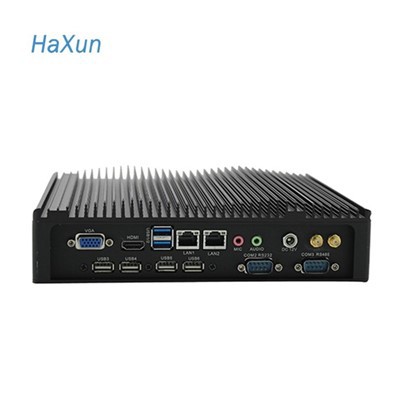
6 x USB 2.0+2x RS232

1 x RJ45

1 x VGA

1 x HDMI

1 x MIC-in

1 x Audio

1x DC IN

2 x Antenna holes (Either optional Wi-Fi or Mobile wireless module)

Power Requirements:

12V DC IN / 8~28V Wide Voltage input( Optional)

Dimensions:

225 mm (W) x 188 mm (D) x 59mm (H)

Construction:

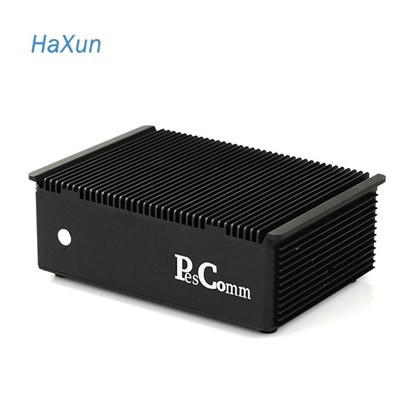
Aluminum Chassis

Environment:

Operating temperature: Ambient with air flow: -10°C to 60°C

(with industrial grade devices)(According to IEC60068-2-1, IEC60068-2-2, IEC60068-2-14)

Storage temperature:

-20°C ~ 80°C

Relative humidity:

10% to 93% (Non-condensing)

Anti-Vibration:

5Hz~500Hz/1Grms/3Axis

Anti-Shock:

15G, 11ms Duration


Types of Fanless Mini PC


The fanless mini PCs produced by our company mainly include the following types:

Fanless Industial PC with GPU

Fanless Industial PC With GPU

Industrial GPU computer is the ideal solution for Machine Vision,Edge Computing,Traffic Vision,Telemedicine,Intelligent Control,Deep Learning,Artificial Intelligence. The system is designed for applications like digital signage, robotics and other rugged computers demanding high graphic performance.

Rugged Panel PC With Resistive Touch

Industrial Fanless PC With WIFI

The industrial control computer software is a cross platform function configurable software. The software can run under different operating systems such as windows, linux and the functions can be customized according to user needs.

Dual Lans Din Rail Industrial Pc

Dual Lans Din Rail Industrial Pc

Dual network ports allow you to connect DIN RAIL industrial PCs to two independent network segments or VLAN (VLAN), effectively creating isolated networks. This can be useful when processing sensitive data or when certain devices or applications require dedicated network resources.


Benefits of Fanless Mini PCs
 

Compact Design

One of the key issues with fans in standard computers is the space they require. To operate properly, there needs to be space not only for the fan itself, but also for air circulation. With a fanless mini PC, this is not a concern thus allowing for a more compact design. The components of the fanless PC take up minimal space and the parts fit tightly together in the enclosed chassis. With this ergonomic design, fanless mini PCs can be stored easily in a wide variety of settings.

Location Flexibility

Another major benefit of fanless mini PCs is their ability to be moved around and used in different areas. Not only are they extremely portable, but they can be easily mounted on virtually any surface or moving arm. Without concern for fragile fans or air circulation, fanless mini PCs can be utilized in even the harshest conditions.

Mobility Factors

Beyond the simple portability and flexibility of fanless mini PCs, another benefit is their versatile power input technology. When used in the medical field, some fanless mini PCs support hot-swappable batteries and related technology allowing for autonomous control over the PC and other peripherals such as a printer, keyboard, or barcode reader.


Applications of Fanless Mini PC
 
Mini PC Box with J1900 CPU
 

Small Businesses

Fanless mini PCs prove to be indispensable tools for small businesses, owing to their compact size and low power consumption. They can be utilized as point-of-sale systems, digital signage displays, or general-purpose desktop computers, thereby meeting the diverse needs of small-sized enterprises.


Education

Educational institutions, such as classrooms or computer labs, extensively employ fanless mini PCs. These devices facilitate teaching programming by supporting coding applications and various programming languages. Their compact design and versatility make them ideal for fostering interactive learning environments.

Mini PC with PCie Slot
Mini PC Box with J1900 CPU
 

Industrial and Embedded Systems

Fanless mini PCs are frequently integrated into industrial and embedded systems. They serve as reliable control units for machinery, enable sensor monitoring, and perform specialized tasks required in industrial settings. Moreover, their compact nature makes them well-suited for deployment in kiosks and other self-service devices.


Personal Computing

Fanless mini PCs offer an excellent solution for personal computing, particularly for individuals who do not require high-end performance or gaming capabilities. These devices effortlessly handle essential tasks such as web browsing, email management, and document editing, providing an efficient and compact computing experience.

Mini PC Box with J1900 CPU


Fanless Mini PCs vs. Actively Cooled Mini PCs
 

Performance
Mini PCs typically use mobile processors, instead of desktop-grade CPUs. However, even among mobile chips, the differences in performance can still be quite huge. Since passive cooling is not as efficient as active cooling, fanless mini PCs usually sport processors with lower TDP to prevent the system from overheating.


Stability
Overheating can have a series of effects on a mini PC, and none of them is good. First, the electrical resistance of the internal components will drop, leading more electricity to flow through these components than originally designed. This will in return produce even more heat and possibly fry the component. Secondly, the platters making up the computer’s memory sticks and SSDs tend to expand when there’s too much heat, causing the data transfer speed to slow down, and in some worse cases, data loss and even permanent damage to the system.


Portability
Since fanless mini PCs don’t need to reserve a room for cooling fans in the housing, they are generally smaller than actively cooled mini PCs. You can carry it around in your pocket effortlessly, making it more portable than any actively cooled mini PC you can find in the market.


Noise
One of the major benefits of fanless mini PCs is that they tend to run silently or near silently, thanks to the absence of rotating fans and the usage of noise-free solid-state drives. As a result, they are ideal for places where silent operation is needed, such as libraries, hospitals, recording studios, and small conference rooms. Fan-powered systems, on the other hand, will often produce audible noise, which can be a problem in certain areas.


Energy Efficiency
Many people tend to believe that fanless mini PCs are more power-efficient than actively cooled systems as they use lower-power CPUs, but that’s nothing but a misconception. The power draw of a PC system is not fixed, instead, it is constantly fluctuating according to the data being processed by the CPU and other components. Mini PCs with active cooling fans often draw as little power as units without fans when dealing with the same lightweight tasks.


Installation Notes for Fanless Mini PC
 

Don’t stack anything on top of your fanless PCs

Proper airflow over the cooling fins is essential for fanless cooling. Stacking additional equipment or other items on top of the fins will inhibit cooling capabilities and may cause system damage over time.

Don’t install systems in a fully enclosed area

Our fanless cooling solutions are very efficient, but if your system is installed in an enclosed location, like a vehicle trunk or unventilated cabinet, ambient temperatures can quickly rise beyond specified limits.

Don’t use just any power adapter

As mentioned above, how your system is powered is vital to proper performance. The power adapter supplied with your fanless PC may provide electrical protections not native to the PC. Without those protections damage can result. Verify the computer has the required protections if DC power is being used or if another power source is being considered.

Don’t forget about cable management

Fanless industrial computers are frequently subjected to wear and tear from every angle. To ensure secure connections and long-term reliability, don’t rely exclusively on connectors to support the weight of a cable over time. Cables can fail at strain points or damage connector pins from cross loading or vibration wear.

Don’t install the system in direct sunlight

Solar gain (the increase in temperature caused by solar radiation) adds up to 90W per square foot of thermal load. Whether the sun shines on the computer itself, or on an enclosure with the computer inside, try to limit direct sun exposure.

Don’t worry – setup is not challenging

Though they are built to more strict specifications, our fanless computers are as easy to set up as an off the shelf PC. In most cases you will find a similar selection of ports, software options, and settings.


Packaging and Shipping


Packaging

Inner packaging: Inflatable plastic bag

Outer packaging: Cardboard box

Shipping

We will help you to choose the best shipping way according to your detail requirements. By sea, by air, or by express, etc.


Our Certifications


productcate-1-1


Our Factory

Haxun has been deeply engaged in the field of industrial computers and touch products for 15 years. Through industrial-grade chips and adaptive cooling architectures, it has created highly reliable intelligent control terminals. Adhering to the original aspiration of "making machines better understand production", it continuously injects digital momentum into the transformation and upgrading of the manufacturing industry, making equipment more intelligent.

productcate-1-1
productcate-1-1
productcate-1-1
productcate-1-1


FAQ


Q: Do fanless PCs last longer?

A: Fans are one of the most common components that fail on a computer. By removing those moving parts, computers gain a longer lifespan and require minimal maintenance. Fanless PCs consume less energy than fan-based computers, reducing operating costs and environmental impact.

Q: Do mini PCs need fans?

A: Mini PCs are generally very power-efficient, thanks to their small size and the use of lower-power components. This not only helps reduce electricity costs but also minimizes heat output, so they often don't need loud fans to keep cool.

Q: Do fanless computers overheat?

A: Once the passive cooling methods are exhausted, the components could overheat if there is no fan for backup. Because of this, fanless cooling is not ideal in hot locations because the risk of the computer overheating is too high.

Q: How to cool a fanless mini PC?

A: A cooling pad is an accessory placed on the bottom of a mini PC to effectively improve heat dissipation. They are usually made of thermally conductive materials and can effectively transfer the heat generated by the Mini PC to the surrounding environment.

Q: Is mini PC noisy?

A: We sometimes hear reports of mini computers being slightly noisier than our customers expected. Unless they are designated as “fanless” (meaning they have no cooling fan and instead operate entirely on passive heat dissipation), mini PC's will generate some noise.

Q: Are fanless computers good?

A: Fanless computers are capable of performing just as well as their fanned counterparts, plus they have the added benefit of a more rugged case since fan vents can be eliminated. Plus, they'll run silently.

As one of the leading fanless mini PC manufacturers in China, we warmly welcome you to buy discount fanless mini PC made in China here from our factory. All customized products are with high quality and competitive price. For more information, contact us now.

Industrial Fanless Computer With I5, industrial marin pc, poe powered computer

(0/10)

clearall